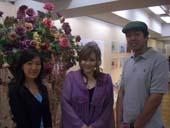
06/02: KAORUKOグループのレオさん独立開店。ご紹介

世界展にKAORUKOファンはじめ多くの卒業生が来てくれましたが写真は掲載しきれないので代表して男性生徒です。というわけでもないのですがKAORUKOの天使ライセンスやブライダルのプロデューサー資格もKAORUKOで取得したレオさんと奥様です。
この春とうとう独立されました。応援してます。頑張ってね。!!井の頭公園近くでフラワーライフプロデュースという店名にして夢に向かって始動です!!お近くの方はお立ち寄り下さい。
| ツイートする |
/* About ----- This directory contains extra files to make the 'fancy urls' feature even more fancier, by eliminating the 'index.php'-part of the URL Installation ------------ 1. Copy all files in this directory (except for index.html) to your main nucleus dir (where your index.php and action.php file are) If you have an already existing .htaccess file (most ftp-programs don't show hidden files by default, so don't start uploading it without checking your server). If you do, download that old one first, and copy the contents of the new .htaccess file (from the fancyurls folder) in your old one, and upload that... 2. Edit this file so that $CONF['Self'] points to your main directory. NOTE: this time, and only this time, the URL should NOT end in a slash 3. Also edit the $CONF['Self'] variable in your index.php, if you don't want to end up with index.php/item/1234 urls when people come via that way 4. Enable 'Fancy URLs' in the Nucleus admin area (nucleus management / edit settings) 5. Off you go! If it doesn't work: ------------------- Remove the files again (don't forget the hidden file .htaccess). Voila. */ // remember: this URL should _NOT_ end with a slash. $CONF['Self'] = 'http://blog.kaoruko.co.jp'; ?>

| ツイートする |