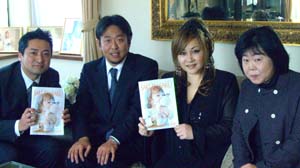
02/11: 取材・・・KAORUKOブランドウエディングについて。

早朝から取材でした。水戸のタウン誌で、KAORUKO特集ページだそうです。わざわざ遠路はるばる水戸からいらしてくださいました。
「サクラサクライフ」のスタッフの方たちと。
この取材の後は、ひざびさにKAORUKOプライベートレッスン。
福岡・茨城・横浜・青山の生徒さんがやってきました。
そして私は今日お誕生日!オメデトーメイルもいくつか頂きました。ありがとうございます!新たなる年にまた頑張ります。。
| ツイートする |
/* About ----- This directory contains extra files to make the 'fancy urls' feature even more fancier, by eliminating the 'index.php'-part of the URL Installation ------------ 1. Copy all files in this directory (except for index.html) to your main nucleus dir (where your index.php and action.php file are) If you have an already existing .htaccess file (most ftp-programs don't show hidden files by default, so don't start uploading it without checking your server). If you do, download that old one first, and copy the contents of the new .htaccess file (from the fancyurls folder) in your old one, and upload that... 2. Edit this file so that $CONF['Self'] points to your main directory. NOTE: this time, and only this time, the URL should NOT end in a slash 3. Also edit the $CONF['Self'] variable in your index.php, if you don't want to end up with index.php/item/1234 urls when people come via that way 4. Enable 'Fancy URLs' in the Nucleus admin area (nucleus management / edit settings) 5. Off you go! If it doesn't work: ------------------- Remove the files again (don't forget the hidden file .htaccess). Voila. */ // remember: this URL should _NOT_ end with a slash. $CONF['Self'] = 'http://blog.kaoruko.co.jp'; ?>

| ツイートする |