
03/28: アシェット婦人画報社でお打ち合わせ。フラワーケーキKAORUKO作
Category: 友人・知人のご紹介と写真
Posted by: kaoruko
昨日はテレ朝の収録の後に局のハイヤーに送っていただいて向かったのは虎ノ門のアシェット婦人画報社。(そうそう朝もテレ朝のハイヤーが横浜自宅までお迎えに来てくださるのよ。かえりも横浜にしとけばよかった・・なんて貧乏根性で少し思ったりして・・でももともと打ち合わせの予定があったんで・・^^)おなじみ25ansウエディングです。とある打ち合わせがあったので。。私のお手製のフラワーケーキを持参で。
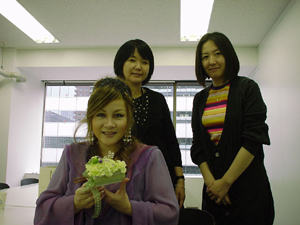 左から
左から
相磯編集長と博多副編集長です。昨日の番組でKAORUKO ○才としつこく何回も出ていてキット日本中の皆さんに知れ渡りビックリされたかもや知れないんですが私たちそれぞれ何才?可愛いでしょ?女子大卒業したての若きOLって感じ??と私は感じている。(^^)
左から相磯編集長と博多副編集長です。昨日の番組でKAORUKO ○才としつこく何回も出ていてキット日本中の皆さんに知れ渡りビックリされたかもや知れないんですが私たちそれぞれ何才?可愛いでしょ?女子大卒業したての若きOLって感じ??と私は感じている。(^^)
| ツイートする |


 KAORUKO Facebook







 TORAY PPO
 TORAY PPO

 コロンビア大使館
 25ansウエディング
 25ansウエディング
 百日草のはなよめ
 フローリスト 2
 25ansウエディング
 フローリスト 1
 25ansウエディング
 フローリスト10
 2010.09
 2010.09
 2010.07.22
 2010.07.02
 2010.05.08
 2010.05
 2010.03


















